
Dies ist eine alte Version des Dokuments!
Inhaltsverzeichnis
ESP8266 WiFi Modules
30.10.2014
I just stumbled over a very cheap possibility to add WiFi connection to simple micro-controller-based applications. 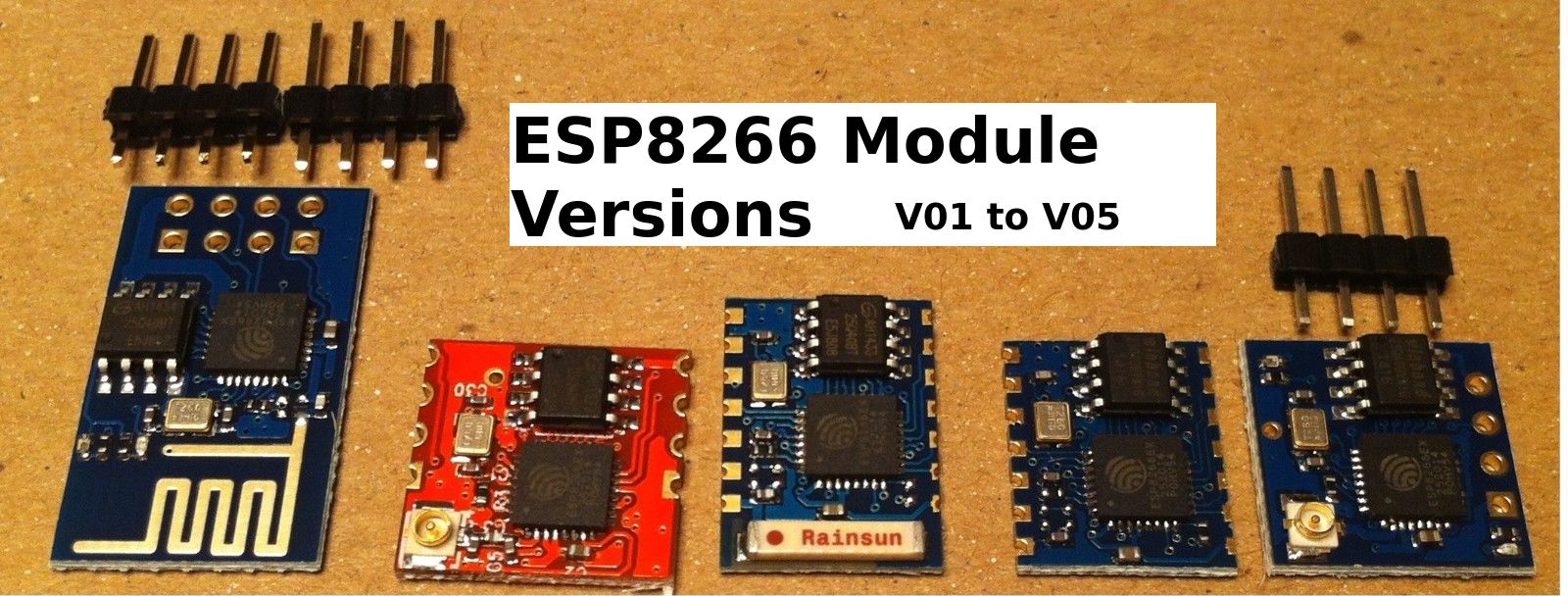
It's price is 2-5 USD on eBay, which is very interesting for simple projects.
The communication is via a 3.3V UART, with AT-commands.
This module supports TCP and UDP, both as a server or a client, which is pretty awesome!
Documentation Sites
My experience
2.12.2014
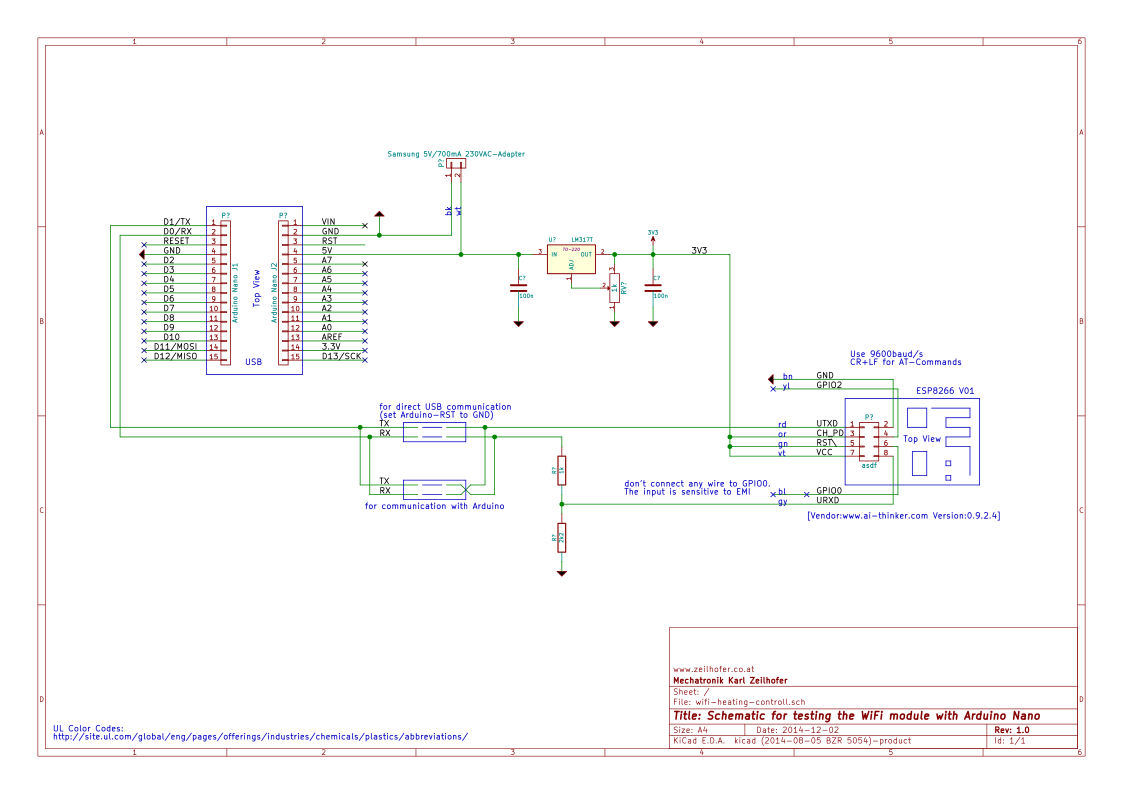
Schematic for testing
Communication
I'm using CuteCom on /dev/ttyUSB0 with 9600baud/s, no parity, 1 Stop-Bit
The USB-UART chip is a CH340G from WCH. It is recognized by Kubuntu without any driver installations.
For direct communication from the PC to the WiFi module, the ATmega-328 is disabled by pulling the RST-line to GND.
On power up we get this message on the CuteCom terminal:
\0xc8DtP\0xa4\0xf8B\0xb6E\0xb4\0x86\0xc8`CXR\0xc0D\0xd0\0x04ixI\0xc0M\0xf9\0xe0:\0x07\0xa4
[Vendor:www.ai-thinker.com Version:0.9.2.4]

ready
Join a WiFi access point
AT+RST
OK
V\0x08\0x88\0xa0\0xd1\0x0c)B\0xeb`!\0x8e\0xc7\0x9c\0x8c\0xc7J\\0x08\0x80\0xfc
[Vendor:www.ai-thinker.com Version:0.9.2.4]
ready
AT+CWMODE=3
no change
AT+RST
OK
\0xa5\0xfcv\0x8c\0xff\0x08\0xa9\0xfc@F\0x01
(\0xe2\0x9e\0x9a*\0x87F\0xe5\0xfc
[Vendor:www.ai-thinker.com Version:0.9.2.4]
ready
Look for access points:
AT+CWLAP
+CWLAP:(4,"MKZ",-58,"30:91:8f:28:f5:df",1)
OK
Join access point ( is shared key):
AT+CWJAP="MKZ","********"
OK
Check if it is connected:
AT+CWJAP?
+CWJAP:"MKZ"
OK
Ping it
In order we can ping the module, we have to find out the IP address. This we get either by looking into the webinterface of the accesspoint, or by following AT command:
AT+CIFSR
192.168.4.1
10.0.0.2
OK
I think, the first IP address is an internal IP address of the module. The second one is the IP address, that the DHCP on the access point assigned to the module.
When we open a terminal on Kubuntu and ping it:
karl@lenovo-w520:~$ ping 10.0.0.2
PING 10.0.0.2 (10.0.0.2) 56(84) bytes of data.
64 bytes from 10.0.0.2: icmp_seq=1 ttl=255 time=67.1 ms
64 bytes from 10.0.0.2: icmp_seq=2 ttl=255 time=294 ms
64 bytes from 10.0.0.2: icmp_seq=3 ttl=255 time=214 ms
64 bytes from 10.0.0.2: icmp_seq=4 ttl=255 time=135 ms
64 bytes from 10.0.0.2: icmp_seq=5 ttl=255 time=61.2 ms
64 bytes from 10.0.0.2: icmp_seq=6 ttl=255 time=279 ms
64 bytes from 10.0.0.2: icmp_seq=7 ttl=255 time=200 ms
64 bytes from 10.0.0.2: icmp_seq=8 ttl=255 time=326 ms
64 bytes from 10.0.0.2: icmp_seq=9 ttl=255 time=42.1 ms
64 bytes from 10.0.0.2: icmp_seq=10 ttl=255 time=482 ms
64 bytes from 10.0.0.2: icmp_seq=11 ttl=255 time=195 ms
64 bytes from 10.0.0.2: icmp_seq=12 ttl=255 time=111 ms
64 bytes from 10.0.0.2: icmp_seq=13 ttl=255 time=32.7 ms
^C
--- 10.0.0.2 ping statistics ---
13 packets transmitted, 13 received, 0% packet loss, time 12015ms
rtt min/avg/max/mdev = 32.722/188.055/482.747/127.476 ms
As we can see, the average response time of 188ms is quite long. But hey, I don't want to use the module for high speed low latency applications. I want to measure temperature and switch on or off a heating system.